My internal SWR meter is reading 1.5:1 on both 2m and 440
running 35 watts into a 50 OHM BIRD load connected DIRECTLY
to the VHF/UHF SO239 connector. Nothing wrong with this load!
Same thing with another BIRD 50 OHM load via a short coax cable.
SWR goes to zip when the power is reduced to 5-10 watts.
Using FM and RTTY modes to generate carrier.
160 thru 6 meter readings are fine.
Are the SWR meter readings valid on 2 and 440?
Royce - W3IF
Showing posts with label Yaesu FT-991 settings. Show all posts
Showing posts with label Yaesu FT-991 settings. Show all posts

FT-991 on ALC Interesting Observation
If you read the manual, the FT-991 wants you to adjust the microphone gain, so in SSB mode the ALC meter peaks about mid-scale… When I got my FT-991 a year ago, I removed the hand microphone within a 24 hour period after some on air testing, getting great reports with the hand mic but then I installed my spare MD-100 microphone.. Microphone gain still set at the default setting of 50 and did not look at the ALC meter setting the first days as I was focused on Power Out and SWR.... Set radio for 95 watts and away I went for the last 12 months… I think it was day 3 or 4 that I got to the part in the manual about setting ALC and Mic Gain, but it was very happy at a setting of 50 for the MD-100..
· Today I was preparing to take my radio out to the back country to do some Astronomy work and some portable FT-991 work… So I pulled out the hand mike that was stored away a year ago and plugged it in..
· I should mention that I never had HUM reports with theMD-100..
· With all the talk about the ALC setting of late, I just happen to have the meter set to display ALC. Mic gain was STILL set to the factory default of 50…
· When I transmitted into my dummy load I had a nice 95 watts but I than noticed that the ALC meter was peaking severely into the RED zone….
· So I began to decrease the MIC gain, and to get the ALC to settle down into its sweet zone I had to reduce the MIC gain down to 13.. I checked all bands and everything was right on both ALC and power output…
· Today I was preparing to take my radio out to the back country to do some Astronomy work and some portable FT-991 work… So I pulled out the hand mike that was stored away a year ago and plugged it in..
· I should mention that I never had HUM reports with theMD-100..
· With all the talk about the ALC setting of late, I just happen to have the meter set to display ALC. Mic gain was STILL set to the factory default of 50…
· When I transmitted into my dummy load I had a nice 95 watts but I than noticed that the ALC meter was peaking severely into the RED zone….
· So I began to decrease the MIC gain, and to get the ALC to settle down into its sweet zone I had to reduce the MIC gain down to 13.. I checked all bands and everything was right on both ALC and power output…
[Yaesu-FT-991-group] Serial Number
My radio is 4N020430. The last owner took delivery Jan 2015. I recently traded a IC-7100 for it. However shortly before he saw my ad in qth.com, he had already sent the radio back to Yaesu. They up dated the Firmware, found the PA bias was out of adjustment and fixed that. Bill had a ton of issues with the ATU and the radio with or without the ATU going into HISWR. The replaced parts in the ATU and did some other mods, but would not tell him what they were or why they did them, even though he called a number of times and asked. He was very open to the condition of the radio and what he did and why before he approached me for a trade. 3 weeks later (Yaesu was slow), he got the radio back, tested it and the same day he mailed it to me and we did the trade...
Was the radio bad? It appears so. It also appears he headed off blown finals... 90% of the time the radio was used vhf/uhf and 10% PSK31 at 20-30 watts.
The ATU is still as bad as the FT-450/AT I once had... 3:1 in a radio that is intended for a field radio these days is just plain stupid.... It will load my G5RV on 40 and 20 meters only. It will smooth the SWR on my vertical on 40, 20, 17, 15, and 10 meters. If I want to use it with a EndFed 9:1 unun, then the internal ATU is useless. Luckily I have a MFJ-2289 Big Ear portable full size dipole for 20-6 meter and with the added coil a OCD for 40 and 30 meters and don't need the internal ATU. The antenna has a built in Guanella Balun and I can honestly say it is THE SINGLE BEST portable antenna I have ever used and that is a long list.
I have had the radio for only a few weeks... Still learning it. Basically a nice radio, but far from easy to use as compared to say the IC-7100, my K3 or even my KX3 and other I have had. I would rate the radio good to very good at this time but far from great. Because all the repeaters in the White mountains of AZ, where I live, belong to clubs and they jumped at the special fusion deal, I will have this radio probably for quite awhile for C4FM/FM. At the time I have used in the radio 95% of the time for Digital using FlDigi. Soon I will tackle WSPR and WSJT-X. 5% if the time FM. I have not tried C4FM as of yet.
Yaesu FT-991 - Programming the Memory Channels
Yaesu FT-991 - Programming the Memory Channels
Talks us through how to program and access the user memory channels of the Yaesu FT-991 transceiver.
Talks us through how to program and access the user memory channels of the Yaesu FT-991 transceiver.
FT991 MENU Setup video
FT991 MENU Setup: Items 1 through 30
I cover Items 1 through 30 in the Setup MENU portion of the FT-991 in this video. This includes such things as Fast, Mid, and Slow AGC time settings, "My Call" Indication display time,
I cover Items 1 through 30 in the Setup MENU portion of the FT-991 in this video. This includes such things as Fast, Mid, and Slow AGC time settings, "My Call" Indication display time,
Yaesu FT-991 More information on finals
Further to my earlier messages, I do have a little more information to pass on.
Here in the UK at least, there have been changes made to the PA circuitry to improve the PA's ability to handle a high SWR. Also some changes to the ALC circuitry & calibration. All new 991's in the UK have these mods.
None of this will probably not come as any great surprise to many on this list. I think we should applaud Yaesu though for dealing with this issue and standing by their customers and the reputation of their products - anyone purchasing new from now on should not have any issues going forwards. I would suggest anyone with any issues should contact their local dealer or service centre for advice.
I hope that helps. I have to say, I have been very impressed with this radio in the first week of ownership - can't wait to use it as my main "holiday" radio!
Before anyone asks, I do not have detailed information about the mods - some information in the corporate world is of course, sensitive and not for public release - quite understandably, give we hams have a penchant for "fiddling" with radios!
I trust I have not breached any "confidentialities" by saying as much as I have, but I wanted to reassure group members that Yaesu have a handle on this.
As I say, I suggest you contact your dealer or service centre if you want further advice and reassurance.
Yaesu-FT-991 USB Audio Codec question
In WSJT I have two USB Audio CODEC's listed:
Microphone (USB Audio CODEC)
Microphone (2-USB Audio CODEC)
Speakers (USB Audio CODEC)
Speakers (2 - USB Audio CODEC)
fldigi shows the same thing. In WSJT, I had to select (2-USB Audio CODEC) for it to work. I don't have fldigi set up yet, just took a peek to see which sound cards were listed.
I had zero USB Audio CODEC's until I turned on the FT-991, then I had two. Is this normal?
Also, I have 3 COM ports associated with the rig:
Silicon Labs CP210X USB to UART Bridge (COM 4)
Silicon Labs CP210X USB to UART Bridge Enhanced Com Port (COM 5)
Silicon Labs CP210X USB to UART Bridge Standard Com Port (COM 6)
Is this normal? I expected two.
Any input would be appreciated. This computer stuff can be confusing when getting used to a new rig.
Microphone (USB Audio CODEC)
Microphone (2-USB Audio CODEC)
Speakers (USB Audio CODEC)
Speakers (2 - USB Audio CODEC)
fldigi shows the same thing. In WSJT, I had to select (2-USB Audio CODEC) for it to work. I don't have fldigi set up yet, just took a peek to see which sound cards were listed.
I had zero USB Audio CODEC's until I turned on the FT-991, then I had two. Is this normal?
Also, I have 3 COM ports associated with the rig:
Silicon Labs CP210X USB to UART Bridge (COM 4)
Silicon Labs CP210X USB to UART Bridge Enhanced Com Port (COM 5)
Silicon Labs CP210X USB to UART Bridge Standard Com Port (COM 6)
Is this normal? I expected two.
Any input would be appreciated. This computer stuff can be confusing when getting used to a new rig.
Config for FT-991
The following illustrates the configuration that I found to work for
WSPR-X and the Yaesu FT-991. Version of WSJT-X is V1.6.0_RC2 r6253
running under Windows 7.

The enhanced port for my FT-991

The enhanced port for my FT-991
Yaesu FT-991 Final Stage
For background information please refer to my previous posts and the
comments received on the FT-991 ALC problem and HF PA issue.
The following procedure for setting the Yaesu FT-991 final stage idling current has not been verified against Yaesu’s technical supplement for the FT-991. Use this procedure at your own risk.
Having noticed that the idling current measured on the working FT-991 was circa 2.5A and studying the FT-450 technical supplement for similarities (thanks to Dave Bird G6JED for that pointer), I noted that the FT-450 technical supplement specifies 1A (+/- 100ma) for each RD100HFF1. If you set the FT-991’s idling current accordingly, max RF output is on the low side circa (90W) on 20m USB. My conclusion from testing is that the idling current for each of the RD100HFFI’s should be circa 1.25A to achieve full output or at least it gets the radio to the total idle current of 2.5A originally set by Yaesu. While I initially opted to set the idling current to 2.5A, but have subsequently decided to revisit that decision and have chosen to set each RD100HFF1 for 1A giving a total idling current of 2A.
Alignment Procedure Yaesu FT-991 Final Stage Idling Current
The following procedure assumes the top covers of the Yaesu FT-991 have been removed. Click on the image to enlarge to view test and adjustment points.

The following procedure for setting the Yaesu FT-991 final stage idling current has not been verified against Yaesu’s technical supplement for the FT-991. Use this procedure at your own risk.
Having noticed that the idling current measured on the working FT-991 was circa 2.5A and studying the FT-450 technical supplement for similarities (thanks to Dave Bird G6JED for that pointer), I noted that the FT-450 technical supplement specifies 1A (+/- 100ma) for each RD100HFF1. If you set the FT-991’s idling current accordingly, max RF output is on the low side circa (90W) on 20m USB. My conclusion from testing is that the idling current for each of the RD100HFFI’s should be circa 1.25A to achieve full output or at least it gets the radio to the total idle current of 2.5A originally set by Yaesu. While I initially opted to set the idling current to 2.5A, but have subsequently decided to revisit that decision and have chosen to set each RD100HFF1 for 1A giving a total idling current of 2A.
Alignment Procedure Yaesu FT-991 Final Stage Idling Current
The following procedure assumes the top covers of the Yaesu FT-991 have been removed. Click on the image to enlarge to view test and adjustment points.

- Ensure a dummy load is connected to the HF antenna
[Yaesu-FT-991] Memory Recall
[Yaesu-FT-991] Memory Recall
I'm sure I'm missing something in the manual. I have programmed some memories with no problem. When I try to recall a memory, I hit the MCH softkey and nothing happens when I turn the multi knob. I can see the list of memory channels, but I can't recall one. Otherwise, I'm really enjoying my new FT991.
When I have the normal Frequency and S-Meter up on the FT-991 TFT screen, I just hit the V/M button and the rig goes the the last memory channel I last used. Then just use the MULTI knob to scroll through the memory channels.
Press the M/V button to be in memory mode, MEM ## in upper left of touch screen. Touch the MCH touch key. Rotate the Multi knob and memories will scroll thru the frequency window, MEM # changing.
You cannot recall memories when screen shows the Grey memory list.
You cannot recall memories when screen shows the Grey memory list.
To recall memories you press the V/M button. To change from memory channel to memory channel, you press the MCH Icon on the screen, then rotate the MULTI knob.
[Yaesu-FT-991] Power Used on Standby | Receive
Does anyone know how much power the FT991 uses on standby or in receive mode.
Or more specifically how would it work running off of a battery if I dial the power down to 5 or 10 watts.
Ham Radio Deluxe – Yaesu FT-991 settings
Ham Radio Deluxe – Yaesu FT-991 settings
 just want to let you folks know that the FT-991 does not require any interface devices to work digital modes.
The built in USB port combined with the Yeasu USB port drivers works directly with your PC.
You must install the Yeasu USB drivers first.
Connect the USB cable and 2 com ports are created
Select the enhanced com port for the Cat Control
There will be on new USB Audio Codec installed - this provides the mic input and speaker output for the Digital modes.
In HRD software. (thanks to Chuck Martin, ko1i )
Use 38400, 8,2,N and for flow control I have RTS enabled (default) on the FT-991 menu and I checked the box for RTS on the HRD setup screen (it did not work until I set up the correct RTS mode).

Yaesu FT-991 settings Property of COM-port
- Use the Enhanced COM Port
FT-991 Menu;
Menu
- 031 CAT RATE – 38400bp

Anyone using HRD with your FT-991?
When I go to new set up under Yaesu they do not have FT-991, so what does use, or is there an update for this program?
The newer versions have it. I'm using 6.3.0.429 which has it. It does not have all the menu options or C4FM as a mode however.
The built in USB port combined with the Yeasu USB port drivers works directly with your PC.
You must install the Yeasu USB drivers first.
Connect the USB cable and 2 com ports are created
Select the enhanced com port for the Cat Control
There will be on new USB Audio Codec installed - this provides the mic input and speaker output for the Digital modes.
In HRD software. (thanks to Chuck Martin, ko1i )
Use 38400, 8,2,N and for flow control I have RTS enabled (default) on the FT-991 menu and I checked the box for RTS on the HRD setup screen (it did not work until I set up the correct RTS mode).

Yaesu FT-991 settings Property of COM-port
- Use the Enhanced COM Port
FT-991 Menu;
Menu
- 031 CAT RATE – 38400bp

Yaesu FT-991 inputting the Manual Call Sign
Yaesu FT-991 Operating Manual (Page 11 of 155)
When turning on the power for the first time after purchase, or after resetting the transceiver, enter your own call sign.
The call sign will be displayed on the start screen when turning on the power and will be used to identify the station when sending messages during digital communication.
1. Press and hold the MENU(SETUP) button.
2. Touch [ MY CALL ] on the LCD.
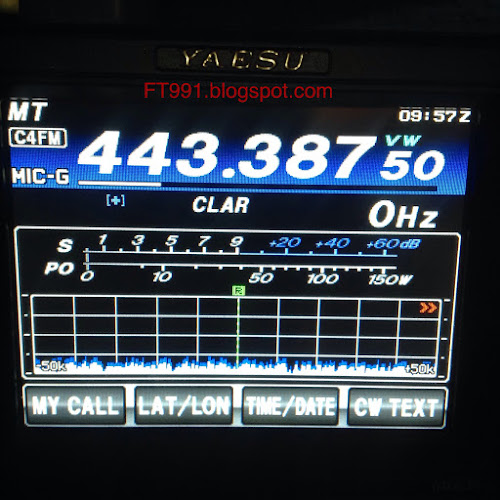

Advice
The time duration of the initial call sign start upscreen display may be changed from the Menu item
"005 MY CALL INDICATION".
3. Touch a character key. The touched character will be displayed at the top of the screen. Enter each character of your call sign.
Advice
Up to 10 characters (letters, numbers, and symbols) can be entered.
4. Touch [ ENT ] on the LCD. The call sign setting is completed and the display will switch to the frequency display screen.
When turning on the power for the first time after purchase, or after resetting the transceiver, enter your own call sign.
The call sign will be displayed on the start screen when turning on the power and will be used to identify the station when sending messages during digital communication.
1. Press and hold the MENU(SETUP) button.
2. Touch [ MY CALL ] on the LCD.


Advice
The time duration of the initial call sign start upscreen display may be changed from the Menu item
"005 MY CALL INDICATION".
3. Touch a character key. The touched character will be displayed at the top of the screen. Enter each character of your call sign.
Advice
Up to 10 characters (letters, numbers, and symbols) can be entered.
4. Touch [ ENT ] on the LCD. The call sign setting is completed and the display will switch to the frequency display screen.
Subscribe to:
Posts (Atom)